
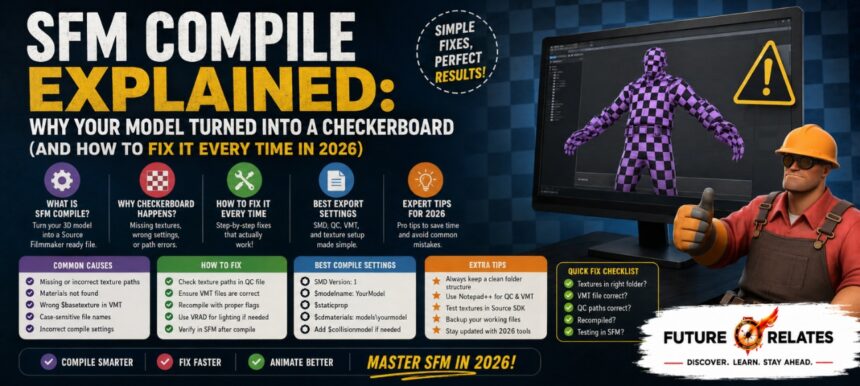

You spent hours on a model. You drag it into Source Filmmaker, hit load, and there it is… a horrifying pink and black checkerboard staring back at you. If that sounds familiar, welcome to the club. Almost every SFM beginner hits this exact wall.
- What Does SFM Compile Actually Mean?
- Why Source Filmmaker Can’t Just Use Your Model As-Is
- How the SFM Compile Pipeline Works, Stage by Stage
- Every Tool You Need for SFM Compile
- Understanding Every File Used in SFM Compilation
- QC Files Explained Without the Confusion
- How to Compile an SFM Model, Step by Step
- SMD vs DMX: Which Format Should You Use?
- Crowbar vs StudioMDL: Choosing the Right Compiler
- Common SFM Compile Errors and How to Fix Them
- How to Speed Up Your SFM Compile Workflow
- Advanced SFM Compile Techniques
- Beginner Workflow: Where to Start With SFM Compile
- Best Practices Experienced SFM Creators Follow
- SFM Compile vs Modern Game Engine Workflows
- Frequently Asked Questions About SFM Compile
- Conclusion — Turning Compile From a Headache Into a Habit
Here’s the thing: that checkerboard isn’t random. It’s a signal, and once you understand the SFM Compile process, you’ll know exactly why it happened and how to stop it from ever happening again. This guide walks you through the whole pipeline, from your first export to your final test, in plain language.
What Does SFM Compile Actually Mean?
The phrase trips people up because it means two different things depending on who’s talking.
| Quick Reference | Detail |
|---|---|
| Main topic | SFM Compile (Source Filmmaker model compilation) |
| Core compiler | StudioMDL (free) |
| Beginner tool | Crowbar (free GUI wrapper) |
| Output format | .mdl (plus .vvd, .vtx, .phy) |
| Most common error | Checkerboard texture (88% path-related) |
| Simple compile time | 15–30 seconds |
| Reading time | About 8 minutes |
Asset Compilation vs Final Render (Two Different Things)
Asset compilation is the technical one. You take a 3D model, its skeleton, textures, and animations, then convert them into files the Source Engine can actually read. That means a .mdl file plus its supporting .vvd, .vtx, and .phy. StudioMDL does this by reading a QC file.
Final render is the community usage. That’s when you export a finished SFM timeline into a video or image sequence, like .mp4, .avi, or .tga. It uses render settings, not QC files.
The Short Answer for Beginners
If you’re seeing a checkerboard, you’re dealing with asset compilation. If your export is just painfully slow, that’s a render issue. Keep those two separate in your head and half the confusion disappears.
Why the Checkerboard Appears
That pink and black pattern is the engine’s way of saying “I can’t find your texture.” Usually it’s a missing VMT or VTF file, or a wrong $cdmaterials path. It’s rarely a real compile failure. It’s almost always a material path problem.
Why Source Filmmaker Can’t Just Use Your Model As-Is
How the Source Engine Reads Models
The Source Engine only speaks one language for models: .mdl. It cannot open .blend, .max, .fbx, or .obj directly. Your editable files carry tons of data the runtime doesn’t need, so compiling strips that away and builds a leaner, optimized binary the engine loads fast.
When You Actually Need to Compile
You’ll run an SFM Compile whenever you make custom characters, custom props, port a model from another Source game, or edit an existing model. Basically, anything that isn’t already a finished .mdl needs compiling first.
How the SFM Compile Pipeline Works, Stage by Stage
The Full Workflow at a Glance
Create or edit your model → export SMD/DMX → prepare textures and materials (VTF/VMT) → write the QC file → compile with Crowbar or StudioMDL → generate MDL/VVD/VTX/PHY → place files in the correct directory → import into SFM → test and troubleshoot → fix, recompile, retest.
How Each Stage Feeds the Next
Think of it like an assembly line. Each stage hands finished work to the next one. If your export is messy, the compile inherits the mess. That’s why fixing problems early saves you a lot of pain later.
Every Tool You Need for SFM Compile
StudioMDL — The Core Compiler
StudioMDL (the actual studiomdl.exe) is the official Valve compiler. It’s command-line, it’s free, and it’s not very forgiving. It does the real work behind every SFM Compile.
Crowbar — The Beginner-Friendly Interface
Crowbar is a free GUI wrapper around StudioMDL. It gives you readable logs and an easier setup. To be honest, most people should start here. Just remember Crowbar can’t fix a broken QC or bad source files, it only makes StudioMDL easier to use.
Blender and Blender Source Tools
Blender is free and, paired with the Blender Source Tools add-on, exports SMD and DMX files cleanly. Compare that to Autodesk Maya or 3ds Max, which run around $1,700 per year. For SFM work, Blender does everything you need.
VTFEdit, GCFScape, Notepad++, and HLMV
VTFEdit converts images into Valve Texture Format. GCFScape opens Valve’s packed files so you can study assets. Notepad++ (or Visual Studio Code) edits QC files without adding junk. HLMV, the Half-Life Model Viewer, lets you inspect a model before it ever touches SFM.
Optional Productivity Tools
FFmpeg handles video conversion, Git tracks your file versions, and batch scripts (.bat) automate repeat compiles. Python can push automation even further once you’re comfortable.
Understanding Every File Used in SFM Compilation
| File | Role | Required | Common Issue |
|---|---|---|---|
| QC | Compiler instruction script | Yes | Syntax errors, wrong paths |
| SMD | Geometry, skeleton, animation | Usually | Export issues, scale mismatch |
| DMX | Advanced model/animation format | Optional | Version mismatch |
| MDL | Main compiled model | Yes (output) | Corruption, failed compile |
| VVD | Vertex data | Auto-generated | Missing/outdated |
| VTX | Rendering/optimization data | Auto-generated | Compile/render failure |
| PHY | Collision/physics data | Optional | Wrong collision behavior |
| VTF | Texture image data | Yes | Missing textures |
| VMT | Material/shader definition | Yes | Pink/black checkerboard |
Input Files (SMD, DMX, QC)
These are what you feed the compiler. SMD carries geometry and skeleton data, DMX handles advanced rigs, and the QC tells StudioMDL what to do.
Output Files (MDL, VVD, VTX, PHY)
The compiler spits these out. The MDL is the main model, VVD holds vertex data, VTX handles rendering, and PHY covers collision. Most of these generate automatically.
Material Files (VTF and VMT)
VTF is your actual texture image. VMT is the material definition that points to it. Get the VMT wrong, and hello checkerboard.
QC Files Explained Without the Confusion
What a QC File Controls
The QC file is just a text script that tells the compiler how to assemble your model. It names the output, points to meshes, links materials, and defines animations.
Common QC Directives
$modelname— output name and location$body— the main visible reference mesh$cdmaterials— the folder where VMT files live$sequence— animation sequences (with fps, loop)$collisionmodel— physics mesh (with$concave,$mass 40,$maxconvexpieces 64)$surfaceprop— surface behavior, like metal$lod— level of detail rules
QC Rules That Prevent Errors
Use forward slashes only. Use relative paths only. Comment lines with //. Start minimal, then add complexity once the basics compile clean.
How to Compile an SFM Model, Step by Step
Step 1 — Prepare and Clean Your Model
Apply your transforms (scale, rotation, location) before anything else. Keep triangles under 60,000 for stability and stay under 65,535 vertices per mesh.
Step 2 — Export SMD or DMX Files
Export your reference mesh and animations. Match your skeleton hierarchy across every file so bones line up.
Step 3 — Prepare Textures and Materials
Convert images to VTF with VTFEdit. Write your VMT files, using shaders like VertexLitGeneric with values such as $phong 1 and $phongexponent 32.
Step 4 — Write the QC File
Start small. Add $modelname, $body, and $cdmaterials first. Compile, then layer in sequences and collision.
Step 5 — Compile With Crowbar or StudioMDL
Point Crowbar at your QC and hit compile. A simple model finishes in 15–30 seconds. Medium models take about 45 seconds, complex ones 2–3 minutes.
Step 6 — Verify Output Files and Test in HLMV and SFM
Check that your MDL, VVD, and VTX all landed in the right folder. Open it in HLMV first, then load it into SFM.
SMD vs DMX: Which Format Should You Use?
When to Choose SMD
SMD is older, text-based, and widely supported. It’s easy to debug and perfect for beginners and simple props.
When to Choose DMX
DMX is newer and binary. It shines with complex rigs, flex controllers, and facial animation. Practical rule: stick with SMD unless you specifically need a DMX feature.
Crowbar vs StudioMDL: Choosing the Right Compiler
StudioMDL Strengths and Weaknesses
It’s the official compiler and does the real work. But it’s command-line and unforgiving of mistakes.
Crowbar Strengths and Weaknesses
Crowbar wraps StudioMDL in a friendly interface with readable logs. It can’t repair broken files, though, since it’s just a front end.
Which One Beginners Should Start With
Start with Crowbar. It gives you StudioMDL’s power with far less headache.
Common SFM Compile Errors and How to Fix Them
What’s interesting is that community reports show clear patterns: broken texture paths cause 88% of issues, incorrect scale 62%, and rig or bone errors 54%. Around 80% of failures trace back to texture problems.
Pink or Checkerboard Textures (The 88% Problem)
Missing or incorrect VMT/VTF, or a wrong $cdmaterials path. Fix the path, confirm the files exist. Usually a material problem, not a real compile error.
Invisible or Wrong-Sized Models
A scale, transform, or origin issue, or a wrong body reference. Apply transforms and re-export.
Missing VVD or Physics File Errors
No collision compiled. Add $collisionmodel with $concave.
Broken Animations and Skeleton Mismatches
A “missing bone” error means your reference and animation SMDs differ. Re-export with matching hierarchy and check your $sequence names.
Out of Memory and Vertex Limit Errors
Too many polygons or bones. Drop below 60,000 triangles, split meshes exceeding 65,535 vertices into body groups, and close background apps.
“Compile Succeeded But Nothing Shows Up”
Your files went to the wrong directory. Match your output to the usermod structure and restart SFM.
How to Speed Up Your SFM Compile Workflow
Hardware That Matters (SSD, CPU Cores)
Compiling on an SSD runs about 70% faster than on an HDD. That single change is the cheapest speed boost you’ll find.
Multi-Core Compiling and Batch Scripts
Use the -numthreads flag. On an 8-core CPU, set -numthreads 7 (core count minus one). Batch scripts let you compile several models in one go.
Why Clean Workflow Beats Better Hardware
To be honest, no SSD saves a messy folder structure. Clean files and correct paths beat raw power every time.
Advanced SFM Compile Techniques
Custom Collision Models
Build a dedicated physics mesh and link it with $collisionmodel for realistic behavior.
Level of Detail (LOD) Stages
LOD swaps in simpler meshes at distance, keeping scenes smooth without losing close-up detail.
Body Groups, Skins, and Material Overrides
Body groups toggle parts on and off, skins swap textures, and material overrides adjust looks on the fly.
Facial Flex and Custom Shaders
Flex controllers drive facial animation, while custom shaders push your materials beyond the defaults.
Beginner Workflow: Where to Start With SFM Compile
Start With a Low-Polygon Prop
Skip the character rig for now. A simple crate teaches you the whole loop fast.
Install and Organize Your Tools
Grab Blender, Crowbar, VTFEdit, and Notepad++. Set them up before you start.
Write Your First QC File by Hand
Typing it yourself teaches you more than any generator. You’ll actually understand what each line does.
Compile, Test, and Repeat
Change one thing at a time. Compile, check, adjust. Slow beats guessing.
Study Decompiled Valve Models
Decompile a Valve model in Crowbar to see how the pros structure things. For learning only, not redistribution.
Best Practices Experienced SFM Creators Follow
Keep a Consistent Folder Structure
Separate your source, textures, QC, and output. Clean folders prevent lost files.
Test in Small Steps and Read the Log
Always read the compile log and find the first real error, not the last symptom. That habit alone saves hours.
Reusable QC Templates and Backups
Save QC templates that work and back up before big changes.
Consistent Naming Conventions
Use lowercase names and avoid last-minute renames that break paths.
SFM Compile vs Modern Game Engine Workflows
Source Engine’s Manual Approach
Source relies on manual QC scripting, StudioMDL, and the MDL format. Steeper curve, but you get granular control.
How Unreal and Unity Handle It Differently
Unreal Engine 5 and Unity import FBX or glTF directly, with visual panels and automatic material detection. Gentler curve, less manual scripting.
Frequently Asked Questions About SFM Compile
What does SFM compile mean in simple terms?
It’s converting your 3D model into .mdl files the Source Engine can read. StudioMDL does this using a QC file. Without it, SFM can’t load your model.
Do I need Crowbar to compile SFM models?
No, but it helps a lot. Crowbar is a friendly wrapper around StudioMDL, which is the real compiler. You can use StudioMDL alone, but Crowbar makes it easier.
Why does my model show purple and black textures?
That checkerboard means a missing texture. It’s usually a wrong $cdmaterials path or a missing VMT/VTF file. Fix the path and confirm the files exist.
Can I compile directly from Blender?
Not directly. Blender exports SMD or DMX files with the Blender Source Tools add-on, then StudioMDL compiles them. Blender prepares the files; it doesn’t replace the compiler.
What’s the difference between SMD and DMX?
SMD is older, text-based, and great for beginners and simple props. DMX is newer, binary, and better for complex rigs and facial animation. Start with SMD unless you need DMX features.
How long does an SFM compile take?
A simple model compiles in 15–30 seconds. Medium models take around 45 seconds, and complex ones run 2–3 minutes. An SSD speeds this up by roughly 70%.
Does SFM compile work with Source 2?
Traditional SFM runs on the original Source Engine and its MDL pipeline. Source 2 uses a different system. This guide focuses on the classic Source Filmmaker workflow.
Do I need programming skills for SFM compile?
No. QC files are simple scripts, not real programming. Basic automation with batch scripts or Python is optional once you’re advanced.
Can I compile animations separately?
Yes. You can export and compile animation sequences on their own using $sequence directives. Just keep the skeleton hierarchy consistent with your reference mesh.
Can I decompile existing models to learn from them?
Yes, with Crowbar. Decompiling Valve models is a great way to study QC setups and folder structure. Do it for learning only, not for redistribution.
Conclusion — Turning Compile From a Headache Into a Habit
Here’s the real takeaway: the SFM Compile process isn’t magic, and that checkerboard isn’t a curse. Almost every problem comes down to four things: clean files, correct paths, a valid QC, and careful testing. Nail those, and your models load right the first time far more often.
So start small. Compile a low-poly prop, read your logs, and change one thing at a time. Do that a few times and the whole SFM Compile workflow stops feeling scary and starts feeling like second nature.