
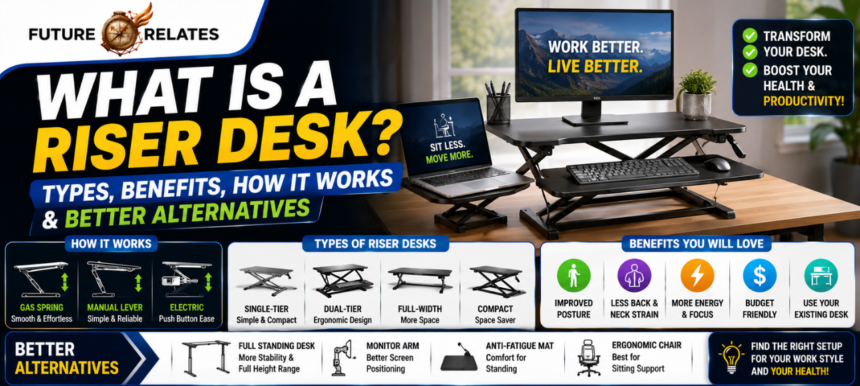

So you’ve been sitting for hours, your neck feels stiff, and someone mentioned you should try a riser desk. But what is a riser desk, exactly? Good question! In short, a riser desk is a height-adjustable platform you place on top of your existing desk. It lifts your monitor, keyboard, and mouse so you can work standing up without buying a whole new desk.
- What Is a Riser Desk?
- How Does a Riser Desk Work?
- What Is the Purpose of a Riser Desk?
- Types of Riser Desks
- Benefits of a Riser Desk
- Riser Desk vs Standing Desk
- Riser Desk vs Desk Shelf
- Is a Riser Desk Worth It?
- How to Choose the Right Riser Desk
- How High Should a Riser Desk Be?
- Ergonomic Tips for Using a Riser Desk Correctly
- Common Problems With Desk Risers
- Best Standing Desk Converter Features to Look For
- Better Alternatives to a Riser Desk
- FAQs
- Final Verdict
People search for this term all the time, and honestly, it makes sense. Sitting 8 to 10 hours a day takes a toll. A riser desk gives you an easy, budget-friendly way to test standing work before committing to something bigger.
In this guide, I’ll walk you through how these things work, the different types, the real benefits, and where they fall short. We’ll also compare a riser desk with a full standing desk, cover ergonomic setup tips, and look at smarter alternatives if a riser isn’t your best fit.
Quick answer: A riser desk (also called a desk riser or standing desk converter) is an add-on workstation that raises part of your desk surface, letting you switch between sitting and standing throughout the day.
What Is a Riser Desk?
|
Feature |
Riser Desk (Converter) |
|---|---|
|
What it is |
Height-adjustable platform placed on top of your desk |
|
Price range |
$100 to $400 (most models) |
|
Weight capacity |
15 to 35 kg (roughly 33 to 77 lbs) |
|
Setup |
Fast, often pre-assembled |
|
Best for |
Renters, small spaces, budget buyers, testing sit-stand work |
|
Main limitation |
Raises only part of your desk surface |
Simple definition
A riser desk sits on your current desk and elevates your screen and keyboard to standing height. Think of it as a “desk on top of a desk.” When you want to sit, you push it back down. That’s the whole magic.
Riser desk vs desk riser vs standing desk converter
Here’s the thing: these three terms describe basically the same product. A desk riser and a standing desk converter both mean an adjustable platform that turns a sitting desk into a standing desk. You’ll also hear “sit-stand converter” and “desktop riser.” They’re cousins, not strangers.
Why the terms are often used interchangeably
Brands and retailers each pick their favorite label. FlexiSpot might say “standing desk converter,” while another shop says “desk riser.” What’s interesting is that the function stays identical. Don’t overthink the name.
How Does a Riser Desk Work?
Most riser desks lift and lower using one of three mechanisms. Let me break each one down.
Gas spring and pneumatic risers
These use a gas spring mechanism, kind of like the ones in office chairs. You squeeze a lever, the platform floats up or down, and you let go when it’s set. The lift feels smooth and takes just seconds. Great for quick transitions.
Manual lever and crank risers
Some budget models use a hand crank or a simple lever release. They cost less, but to be honest, cranking can get tiring if you switch positions several times a day. Still, they’re reliable and rarely break.
Electric riser desks
Press a button and the motor does the work. Fancier electric models offer memory presets, so one tap moves you to your favorite standing height. Adjustment speeds hover around 40 mm per second. Convenient, though pricier.
Single-level vs dual-level work surface design
A single-tier riser gives you one flat surface for everything. A dual-tier riser separates the monitor shelf (top) from a lower keyboard tray. Dual-tier keeps your wrists at a healthier angle and frees up top-shelf space for your coffee mug and notebook.
What Is the Purpose of a Riser Desk?
Reduce prolonged sitting
Sitting for 6+ hours straight is linked to poor circulation, weight gain, and back pain. A riser desk breaks up that pattern by making standing effortless.
Create a sit-stand workflow without replacing your desk
This is the big one. You keep your beloved desk, whether it’s an antique writing desk or a plain office setup, and simply add movement to your day.
Improve monitor and keyboard height
Most seated desks sit at 28 to 30 inches, which forces you to hunch. A riser lifts your screen 10 to 12 inches higher, bringing it closer to eye level.
Types of Riser Desks
Single-tier risers
One surface, clean look, good for laptop setups. Everything rises together.
Dual-tier risers
Separate monitor and keyboard levels. Better ergonomics for typing-heavy work.
Full-width risers
These stretch across nearly your whole desk, some up to 46 inches wide. Ideal if you love spreading out folders and office supplies.
Compact risers
Small footprint, often around 16 to 28 inches wide. Perfect for a narrow desk or cubicle.
Manual vs electric riser desks
Manual = cheaper, muscle-powered. Electric = pricier, push-button ease with memory presets. Pick based on how often you’ll switch and your budget.
Desk shelves vs adjustable risers
A desk shelf is fixed height, it just raises your monitor and never moves. A riser adjusts, so it supports actual sit-stand working. Big difference!
Benefits of a Riser Desk
Better posture
Lifting your screen to eye level keeps your neck neutral and your spine happier.
Less neck, shoulder, and back strain
Alternating between sitting and standing reduces spinal load and eases that afternoon stiffness. Many users report less lower back pain within weeks.
Improved focus and energy
That dreaded 3pm energy slump? Standing boosts blood flow and oxygen supply, which helps you stay alert.
More movement during the workday
Even small shifts in posture keep your metabolism ticking and your muscles active.
Affordable standing desk alternative
At $100 to $400, a riser costs far less than a full electric standing desk that can run $400 to $1,200+.
Keeps your existing desk
No hauling out furniture, no drilling. You just set it on top and go.
Riser Desk vs Standing Desk
Cost differences
Riser desks start around $127 to $150. Full standing desks like the UPLIFT V3 or FlexiSpot E7 Pro usually cost several hundred dollars.
Work surface differences
A riser lifts only part of your desk. A standing desk raises the entire surface, which matters if you use a printer, tablet, and dual monitors all at once.
Stability and weight capacity
Full standing desks handle 100 kg or more and barely wobble. Risers top out around 15 to 35 kg and can feel shaky at full height.
Setup and assembly
Risers often arrive pre-assembled. Standing desks need building, sometimes an hour of work.
Which option is better for long-term use
For 8+ hour daily users with heavy multi-monitor setups, a full standing desk wins. For flexibility and savings, a riser is fantastic.
Riser Desk vs Desk Shelf
Key differences in function
A desk shelf stays put at one height. A riser moves up and down.
Which one helps with standing
Only the riser. A desk shelf can’t lift you to standing height, so it won’t create a sit-stand workflow.
Which one is better for monitor height and desk organization
If you only want your monitor a bit higher and some storage underneath, a desk shelf is cheaper and tidier. If you want to stand, choose the riser.
Is a Riser Desk Worth It?
When a riser desk makes sense
If you’re renting, tight on space, or curious about standing work without a big spend, absolutely.
When it falls short
If you run three monitors, work marathon shifts, or hate the stacked look, it may frustrate you.
Who should buy one
Budget-conscious folks, home office users, and anyone testing the sit-stand waters.
Who should skip it
Heavy dual-monitor users, tall people needing extra height, and those wanting premium long-term ergonomics.
How to Choose the Right Riser Desk
Measure your desk width and depth
Make sure the riser fits! Check your desk depth, some risers need 25 inches or more.
Check height range
Confirm the max height suits your standing posture, especially if you’re 6 feet or taller.
Review weight capacity
Add up your gear. If your monitor plus accessories exceed 15 kg, choose a sturdier model.
Consider your monitor setup
Single screen? Any riser works. Dual monitors? Look for wide, stable platforms with monitor arm compatibility.
Choose between manual and electric adjustment
Frequent switcher? Go electric. Occasional stander on a budget? Manual is fine.
Look for keyboard tray and stability features
A sliding keyboard tray and a wide, stable base make a huge difference in daily comfort.
How High Should a Riser Desk Be?
Monitor at eye level
The top of your screen should sit roughly at or just below eye level. No looking down!
Elbows at 90 degrees
Your keyboard height should let your elbows bend at a 90-degree angle.
Wrist and shoulder alignment
Keep wrists flat and shoulders relaxed, not shrugged up toward your ears.
Standing posture basics
Stand tall with a neutral spine and feet flat. If your desk is 30 inches seated, your standing surface usually needs to rise about 10 to 12 inches higher.
Ergonomic Tips for Using a Riser Desk Correctly
Sit-stand timing recommendations
A popular guide is the 20-8-2 rule: 20 minutes sitting, 8 minutes standing, 2 minutes moving. Others suggest standing 30 to 60 minutes each hour.
Use an anti-fatigue mat
Standing on hard floors gets uncomfortable fast. A cushioned mat saves your feet and knees.
Avoid locking your knees
Keep a soft bend. Locked knees strain your joints and reduce circulation.
Keep wrists flat and shoulders relaxed
Small habit, big payoff for preventing wrist and shoulder pain.
Transition gradually
Don’t jump to standing all day! Ease in over a couple weeks so your body adjusts.
Common Problems With Desk Risers
Wobble at full height
Some models shake at maximum standing height, which is annoying when typing.
Limited space on the existing desk
The riser’s base eats into your desk surface.
Not enough height for tall users
If you’re over 6 feet, double-check the max height before buying.
Limited support for dual monitors
Heavy two-monitor setups can overwhelm lighter risers.
Bulkiness and reduced desk depth
On a small desk, a riser can feel like it’s taking over.
Best Standing Desk Converter Features to Look For
Smooth adjustment mechanism
A gas spring or quality motor makes daily transitions painless.
Stable base
Look for a wide, wobble-resistant frame.
Spacious work surface
A 35-inch or wider top gives you room to breathe.
Sliding keyboard tray
A retractable tray with a curved edge keeps wrists comfy.
Memory presets
Electric models with 2 to 4 presets save your favorite heights.
Cable management and monitor mount compatibility
Tidy cables and monitor arm support keep your setup clean and flexible.
Better Alternatives to a Riser Desk
Full electric standing desk
The gold standard for serious sit-stand work. Moves your whole surface.
Desk shelf for monitor elevation
Cheap fix if you only want a higher screen, no standing needed.
Furniture risers for fixed-height desks
Desk riser blocks lift your entire desk a few inches, handy for tall folks.
Taller desk legs or casters
Swapping legs or adding casters can raise and mobilize your desk.
Adjustable office chair and ergonomic add-ons
Sometimes a better chair, a footrest, and a monitor arm solve your comfort issues without any riser at all.
FAQs
Is a riser desk the same as a standing desk?
Not quite. A riser sits on top of your existing desk, while a standing desk replaces it entirely.
Are desk risers worth it?
Yes, for budget buyers, renters, and anyone testing standing work. They’re affordable and effective.
Can a desk riser help with back pain?
It can! Alternating between sitting and standing reduces spinal load and often eases lower back discomfort.
How much weight can a desk riser hold?
Most handle 15 to 35 kg. Always check the specs against your gear’s weight.
Can I use a riser desk with two monitors?
Some can, but you’ll need a wide, sturdy model. Heavy dual setups suit a full standing desk better.
Which is better: manual or electric desk riser?
Electric is easier and offers presets. Manual is cheaper and reliable. It comes down to budget and how often you switch.
Can I put a desk riser on any desk?
Almost any flat, stable desk works, as long as it’s deep and strong enough to hold the riser and your equipment.
Final Verdict
Best for budget-conscious users
If you want sit-stand benefits without spending big, a riser desk is a smart, affordable pick.
Best for existing desk setups
Love your current desk? A riser lets you keep it while adding healthy movement to your day.
When a full standing desk is the smarter upgrade
For long hours, heavy multi-monitor work, and premium ergonomics, invest in a full standing desk instead.
To wrap it up: a riser desk is a genuinely great starting point for a healthier, more active workday. It’s affordable, easy to set up, and works with the desk you already own. Just know its limits, and if you outgrow it, a full standing desk is always waiting as your next step.
For More Information Visit: https://futurerelates.co.uk/